Sizing Models: Run Your Own or Rent
Time: 25 minutes. Cost: $0. Part one is arithmetic; part two downloads Ollama's
llama3.2(2.0 GB).
TaskFlow's support assistant pays a model provider for every token, the small chunks of text a model reads and writes. One afternoon, a teammate posts a link in the team chat: Qwen3-235B-A22B-Instruct-2507, an open-weight model released under the Apache 2.0 license. Open-weight means the trained model files are published for anyone to download and run. "It is free to download. Why are we paying per token?"
It is a fair question. The weights are free. Running them is not. The model has to fit in memory, it has to answer fast enough for the people waiting on it, and something has to pay for the hardware whether anyone is using it or not.
This chapter turns that question into arithmetic you can repeat for any open-weight model. You will size the model for two workloads, price it four ways, and then measure a small model on your own machine to check the math. By the end, you will know which numbers decide "run it ourselves" against "rent it", and where to find each one.
Start from the workload, not the model
"Can we run a 235B model?" has no answer on its own. The same model needs a very different machine for one developer than for a support team. So I would start with the workload and write down six numbers:
- Users at once. Not total users, but how many requests are in progress at the same moment.
- Requests per day.
- Input tokens per request. The prompt, any pasted documents, and the conversation so far.
- Output tokens per request. The length of a typical answer.
- Context size. The longest conversation you need to support.
- Speed you need. A chat user notices a slow answer. A nightly batch job does not.
The lab uses two illustrative TaskFlow workloads. The numbers are invented for teaching, not measured:
| Workload | At once | Requests a day | Input / output tokens | Context |
|---|---|---|---|---|
| One developer's coding helper | 1 | 200 | 8,000 / 500 | 32,768 |
| Support team of 50 drafting replies | 10 | 4,000 | 3,000 / 400 | 32,768 |
If you already call a hosted model, you do not have to guess. Your provider's usage dashboard or your own logs give you real token counts, which are better than any estimate.
Memory: does it fit?
A model's memory has two parts: the weights, which are the same for everyone, and the KV cache, which grows with every conversation.
The weights
A model's weights are the numbers it learned in training, one per parameter. They need total parameters × bytes per weight. BF16 and FP8 are 16-bit and 8-bit number formats, and storing weights in fewer bits than the original is called quantization:
| Format | Bytes per weight | Qwen3-235B weights |
|---|---|---|
| BF16, the format it ships in | 2 | 470 GB |
| FP8 | 1 | 235 GB |
| Q4_K_M, llama.cpp's popular 4-bit format | about 0.61 | 144 GB |
The Q4_K_M figure comes from the llama.cpp quantize README, which measures it at 4.89 bits per weight. Smaller formats save memory but can lose some quality, so test answers on your own tasks before you commit to one.
This model is a mixture of experts (MoE). Each layer contains many small sub-networks called experts, and a router picks a few of them for each token. The model card describes it as "235B in total and 22B activated". Those two numbers do different jobs:
- Total parameters decide memory. Every expert has to be stored somewhere, even the ones a given token does not use.
- Active parameters decide speed. We come back to this in the next section.
A model without experts is called a dense model. It uses all of its parameters for every token, so for a dense model the two numbers are the same.
The KV cache
While the model reads a conversation, it saves a key and a value for every token in every layer, so it does not have to recompute them. That saved data is the KV cache. Its size per token is:
2 × layers × KV heads × head size × bytes
This is the per-token formula from NVIDIA's inference guide. You do not need to know what a head is to use it. All three model numbers are in the model's config.json on Hugging Face, as num_hidden_layers, num_key_value_heads, and head_dim. For this model, that is 94 layers, 4 KV heads, and a head size of 128:
2 × 94 × 4 × 128 × 2 bytes = 192,512 bytes, about 193 KB per token
One 32,768-token conversation needs about 6.3 GB. Ten people at once need ten caches, about 63 GB, on top of the weights.
Some models shrink the KV cache with a different attention design, such as DeepSeek's multi-head latent attention or the mixed attention layers in some newer Qwen models. The simple formula does not apply to them. Check the model card before you use it.
Speed: how fast can it answer?
Generating one token means reading every active weight from memory once. The arithmetic itself is quick. Moving the weights is the slow part. NVIDIA puts it plainly: the speed at which weights move from memory "dominates the latency, not how fast the computation actually happens." Databricks reaches the same conclusion: memory bandwidth "is a better predictor of speed of token generation than their peak compute performance."
Memory bandwidth is how many gigabytes per second (GB/s) a chip can read from its memory. It gives a simple best case for one request:
tokens per second ≤ memory bandwidth ÷ bytes of active weights
At Q4_K_M, Qwen3-235B reads 22B × 0.61 bytes, about 13.5 GB, for every token. Here is what that means on a few machines:
| Machine | Memory | Bandwidth | Fits at Q4_K_M? | Ceiling, one request |
|---|---|---|---|---|
| Laptop, Apple M4 | up to 32 GB | 120 GB/s | No | 9 tokens/s |
| Laptop, Apple M4 Max | up to 128 GB | up to 546 GB/s | No | 41 tokens/s |
| Gaming GPU, RTX 5090 | 32 GB | 1,792 GB/s | No | 133 tokens/s |
| Desktop, 192 GB DDR5-5600, two channels | 192 GB | 89.6 GB/s | Yes | 7 tokens/s |
Bandwidths are from Apple and NVIDIA. Each DDR5 channel is 8 bytes wide, and DDR5-5600 makes 5,600 million transfers per second (MT/s), so two channels move 2 × 8 bytes × 5,600 million per second = 89.6 GB/s.
The table shows the awkward shape of big MoE models on a desk. The fast machines cannot hold the model. The machine that can hold it reads memory slowly.
At 7 tokens per second, the developer's typical 500-token answer takes more than a minute, and that is the best case. Real software reaches only part of a ceiling. For a coding helper someone is waiting on, that fails the speed check even though the model fits.
There is a middle path for MoE models: a GPU plus a lot of system memory. Tools such as llama.cpp (with --cpu-moe and --n-cpu-moe, described in its server README) and FreeToken keep the experts in system memory and the rest of the model on the GPU. The CPU can compute with the experts where they sit, or the tool can keep the most used experts on the GPU and copy the others over PCIe, the link between the motherboard and the graphics card. Speed then depends on system memory bandwidth, PCIe speed, and how often the needed experts are already on the GPU. It can beat the CPU-only row above, but no formula replaces measuring it on your own machine.
💡 Total parameters decide whether a model fits. Active parameters and memory bandwidth decide how fast it answers. The number of users at once decides how much extra memory you need and whether one machine is enough. Price the workload only after those three check out.
One desk serves one person
A single request uses bandwidth poorly. The machine reads 13.5 GB of weights to produce one token for one person.
Serving software fixes that with batching: it groups many users' requests and reads the weights once for all of them. NVIDIA describes it this way: "Since multiple requests use the same model, the memory cost of the weights is spread out." This is why providers can charge so little per token. Their GPUs read the weights once and answer many customers with that one read.
Batching has a cost. Every request in the batch needs its own KV cache, so memory grows with users at once. Local tools built for one person do not gain much from it. A machine that is fine for you alone can still feel slow for a team of ten.
Put together, the checks run in this order. Memory and speed come first because no price matters if the model cannot run:
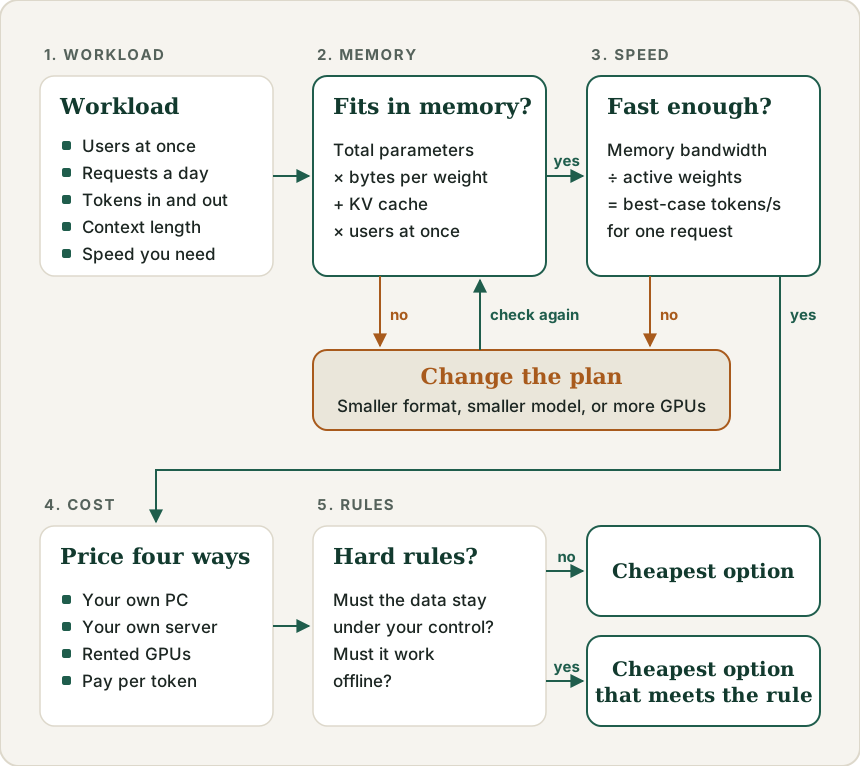
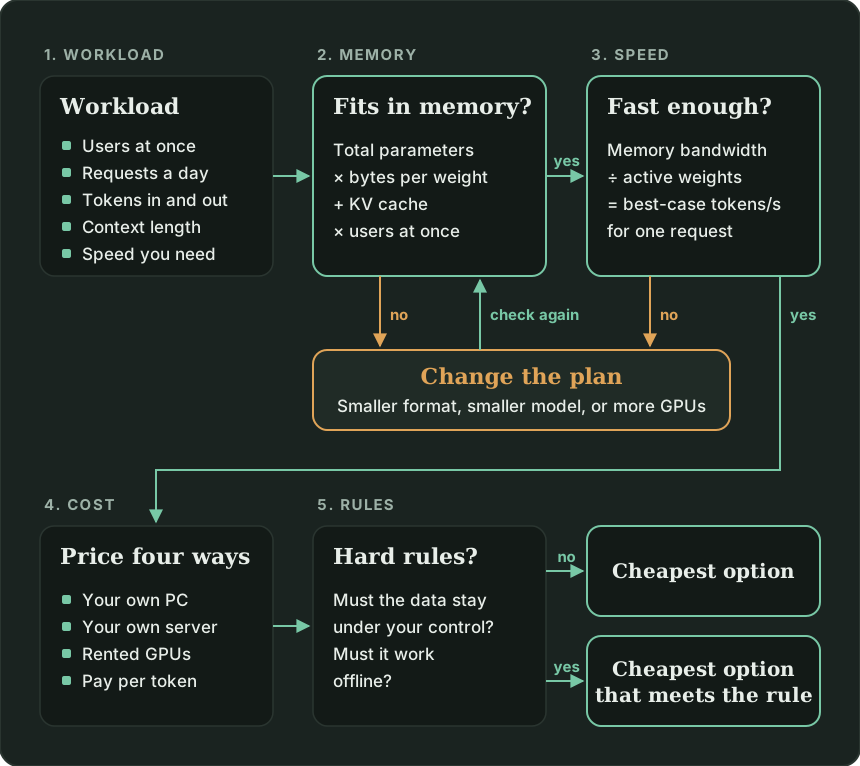
Price the same workload four ways
Once you know what the model needs, there are four ways to get it:
| Option | You pay for | Cost goes up with |
|---|---|---|
| Your own PC | The machine, power, and your time | Nothing, until it is too slow |
| Your own server | Server GPUs, power, space, and people to run it | Nothing, until you need more servers |
| Rented GPUs | GPU-hours, used or not | Hours left running |
| Pay per token | Only the tokens you send and receive | Traffic |
The lab prices both workloads with prices checked on November 9, 2026. OpenRouter, a service that sells access to many models through one API, listed the model at $0.14 per million input tokens and $0.80 per million output tokens. Its four providers ranged from $0.0875 to $0.15 for input, so the lab uses the high end.
On RunPod, an on-demand Secure Cloud H100 SXM, NVIDIA's data-center GPU with 80 GB of memory, was $3.99 per hour. In FP8, the model plus the developer's cache needs 241 GB, so four of those GPUs.
| One developer | Support team of 50 | |
|---|---|---|
| Pay per token | $6.69 a month | $65.12 a month |
| 4 × H100, working hours only | $3,511 a month | $3,511 a month |
| 4 × H100, always on | $11,651 a month | $11,651 a month |
| Per-token cost over 36 months | $241 | $2,344 |
Those rows answer the teammate's question. For the developer, three years of per-token use costs $241. An RTX 5090 alone launched at a $1,999 price, and it cannot even hold this model.
For the support team, always-on GPUs only become cheaper at about 54 billion tokens a month, which is 179 times their traffic. That is about 20,000 tokens every second, around the clock. Most of them would be prompt tokens, which GPUs read much faster than they generate answers, but whether four GPUs can keep up is something to measure, not assume.
I did not price buying your own server because server GPU prices come from vendor quotes, not public price lists. The lab shows the line you have to beat instead: if your hardware, power, and staff time over three years cost more than the per-token bill, owning loses.
These numbers will change. New models arrive, providers cut prices, and GPU rates move every few months. That is why the lab keeps every price as an input with a date. The method stays useful even after the dollar amounts go stale.
What can override cost
For a big open-weight model, paying per token usually wins on price. I would still run my own in a few cases:
- The data cannot leave your control. A per-token request goes to a third-party provider, and each provider has its own data policy. If a contract or regulation forbids that, cost is not the first question.
- It has to work offline. A laptop on a plane or a factory floor without a reliable connection cannot call an API.
- You need a guaranteed, fixed setup. A provider can change quantization, context limits, or availability. On OpenRouter, all four providers for this model served it in FP8 rather than the original BF16, and two of them offered about half of its native 262,144-token context.
- The model is small and you already own the hardware.
llama3.2, the model the course labs use, is 2.0 GB. On a laptop you already have, its extra cost is close to zero. That is where running locally makes the most sense.
Owning has costs that do not show up in the hardware price. Someone has to install updates, watch the machine, and fix it when it stops answering. Count that time.
Hands-on lab: size it, then measure it
Full setup: download this lab's ZIP, then open the 09-model-sizing folder and follow its README.
The lab is one script, model_sizing.py, with every input at the top. The core is four small functions that match the sections above:
def weights_gb(params_billion, fmt):
    return params_billion * BYTES_PER_WEIGHT[fmt]


def kv_cache_gb(tokens):
    # 2 (a key and a value) x layers x KV heads x head size x bytes, per token
    bytes_per_token = 2 * LAYERS * KV_HEADS * HEAD_DIM * KV_CACHE_BYTES
    return bytes_per_token * tokens / 1e9


def memory_needed_gb(workload, fmt):
    cache = kv_cache_gb(workload["context_tokens"]) * workload["users_at_once"]
    return weights_gb(TOTAL_PARAMS_BILLION, fmt) + cache


def speed_ceiling(bandwidth_gb_s, fmt):
    # Each new token reads every active weight once.
    gb_read_per_token = weights_gb(ACTIVE_PARAMS_BILLION, fmt)
    return bandwidth_gb_s / gb_read_per_token
Part one sizes and prices both workloads. A fresh run prints this for the support team:
==================================================================
Support team of 50 drafting replies
==================================================================
10 at once, 4000 requests a day, 264.0M input and 35.2M output tokens a month

Run it yourself (Q4_K_M): needs 207 GB
  Laptop, Apple M4, 32 GB                       does not fit
  Laptop, Apple M4 Max, 128 GB                  does not fit
  Gaming GPU, RTX 5090, 32 GB                   does not fit
  Desktop CPU, 192 GB DDR5-5600, 2 channels     does not fit

Rent GPUs (FP8): needs 298 GB, so 4 x H100 SXM, at most 609 tokens/s per request
  Always on:          $   11,651 a month
  Working hours only: $    3,511 a month

Pay per token:
  This workload:      $    65.12 a month
  Always-on GPUs win only above 54B tokens a month, 179x this workload

Over 36 months, per-token pricing costs $2,344.
Owning only saves money if your hardware, power, and time cost less than that.
The desktop that fit the developer no longer fits. Ten caches add 63 GB.
Part two checks the speed formula on your own machine. It asks Ollama for a short answer from llama3.2, then divides tokens generated by generation time. On a MacBook Pro with an M5 Pro chip (307 GB/s), a fresh run printed:
==================================================================
PART TWO: measure llama3.2 on this machine
==================================================================
Model file: 2.0 GB. Measured: 110 tokens/s (162 tokens).
That means this machine read about 223 GB/s of weights.
Predicted ceiling: 307 GB/s / 2.0 GB = 152 tokens/s. You reached 73% of it.
Three runs in a row landed between 72% and 73%. Your number will differ. The useful part is the ratio: how much of the bandwidth ceiling your machine actually reaches. Use that ratio to discount the ceilings in part one before you trust them.
What the estimate does not tell you
The calculator answers "will it fit, how fast at best, and what will it cost". It does not answer everything:
- Quality. A model that fits in Q4_K_M may answer worse than the FP8 version a provider serves. Test it on your own tasks.
- Real speed. Ceilings are upper bounds for one request. Splitting a model across four GPUs also adds communication between them, so the 609 tokens per second for four H100s is optimistic.
- Total throughput. With batching, one weight read serves several requests, so a server's total tokens per second across all users can be far higher than the one-request ceiling, until computing power or KV cache memory runs out.
- Prompt reading time. The ceiling covers generating tokens. Reading a long prompt first, called prefill, takes extra time, and agents with long prompts feel it most.
- Whether you can use what you rent. The break-even assumes the GPUs stay busy. Idle hours still cost money.
Checkpoint
A teammate says Qwen3-235B uses only 22B parameters per token, so it should fit on a 32 GB RTX 5090 in Q4_K_M. What is wrong with that reasoning?
The 22B active parameters decide how much is read per token, which sets speed. Memory is decided by total parameters, because every expert must be stored even if a given token does not use it. At Q4_K_M, all 235B parameters take about 144 GB, far more than 32 GB. Offloading tools can keep most experts in system memory, but then the machine needs that memory and speed drops to what PCIe allows.
The developer's workload fits on the 192 GB desktop. Why does the support team's workload not fit on the same machine?
The weights are the same size, but the support team has ten requests in progress at once. Each needs its own KV cache, about 6.3 GB for a 32K-token conversation, so ten caches add about 63 GB. The total grows from 150 GB to 207 GB, more than the desktop's 192 GB. Memory rules the machine out before speed is even a question. Team size matters only through how many requests run at the same moment.
In part two, your machine reached only part of its speed ceiling. Why is a ceiling still useful?
The ceiling tells you the best possible case from two numbers you can look up before buying anything: memory bandwidth and model size. If the ceiling is already too slow, no software will fix it, and you can rule the machine out. If the ceiling is high enough, your measured ratio tells you how much to discount it for a realistic estimate.
Check Your Knowledge
Click to start quiz
What's next
Size one model you are actually considering. Copy its total parameters, active parameters, and config.json values into the lab, replace the workload with real token counts from your provider's dashboard or logs, and update the prices to today's. Then decide which of the four options wins, and whether a data or offline rule overrides it.
If per-token pricing wins, Token and Cost Management shows how to cut the bill further with trimming, caching, and routing to smaller models. If you end up using several per-token providers, AI Gateways shows how to fail over between them deliberately. If you want to run small models locally, the course's setup chapter walks through Ollama.
Comments
Comments are provided by Giscus and GitHub. Loading them connects your browser to GitHub, and GitHub's privacy terms apply.